Smart search: ask a laser cutting question, get a working answer
Find Solutions is the smart search in SBM Laser Help. Type a laser cutting question in your own words, like "why is there burr under 6 mm mild steel", and get one answer from the cutting parameter base, defect solutions, error codes and reference articles. It works in the SBM Laser Help app for Android and iOS, the web app and the Telegram bot. Free plan: 2 searches a month.
- Where
- Android, iOS, web app, Telegram bot
- Free plan
- 2 searches a month
- Paid plans
- 5, 10 or 20 searches a month
- Languages
- 12, answer in yours
What the smart search does
Understands plain questions
No forms and no drop-downs. Write metal, thickness, gas and what you see on the part in any order, the way you would ask a colleague. Not sure how to start? Tap one of the examples under "Try:".
Answers from the cutting parameter base
Questions about speed, power, focus, nozzle and gas pressure are answered from the same parameter base as the app tables: carbon steel, stainless steel, aluminum, brass and copper, from 500 W to 80 kW.
Knows defects and error codes
Describe a defect such as burr, dross or a rough edge and get the likely cause and the fix. Type an alarm code from a chiller, servo drive or machine controller and get its meaning, causes and what to check.
Replies in your language
Ask in any of the 12 languages of the app: English, Portuguese, Spanish, German, French, Italian, Turkish, Polish, Russian, Uzbek, Hindi or Arabic. The answer comes back in the language of your app.
Rate the answer
Under every answer there are two buttons: "It worked, thanks" and "It didn't work". If it did not work, a short form asks what went wrong and can open the support chat with your question already filled in.
Keeps your past questions
Every search is saved to the History tab of your Machine profile. Opening an old question puts it back in the search box without sending it, so it does not use a search until you press Search again.
How to use Find Solutions
- Open Find SolutionsIt is the first item in the main menu of the app, the web app and the Telegram bot. Sign in with your SBM Laser Help account.
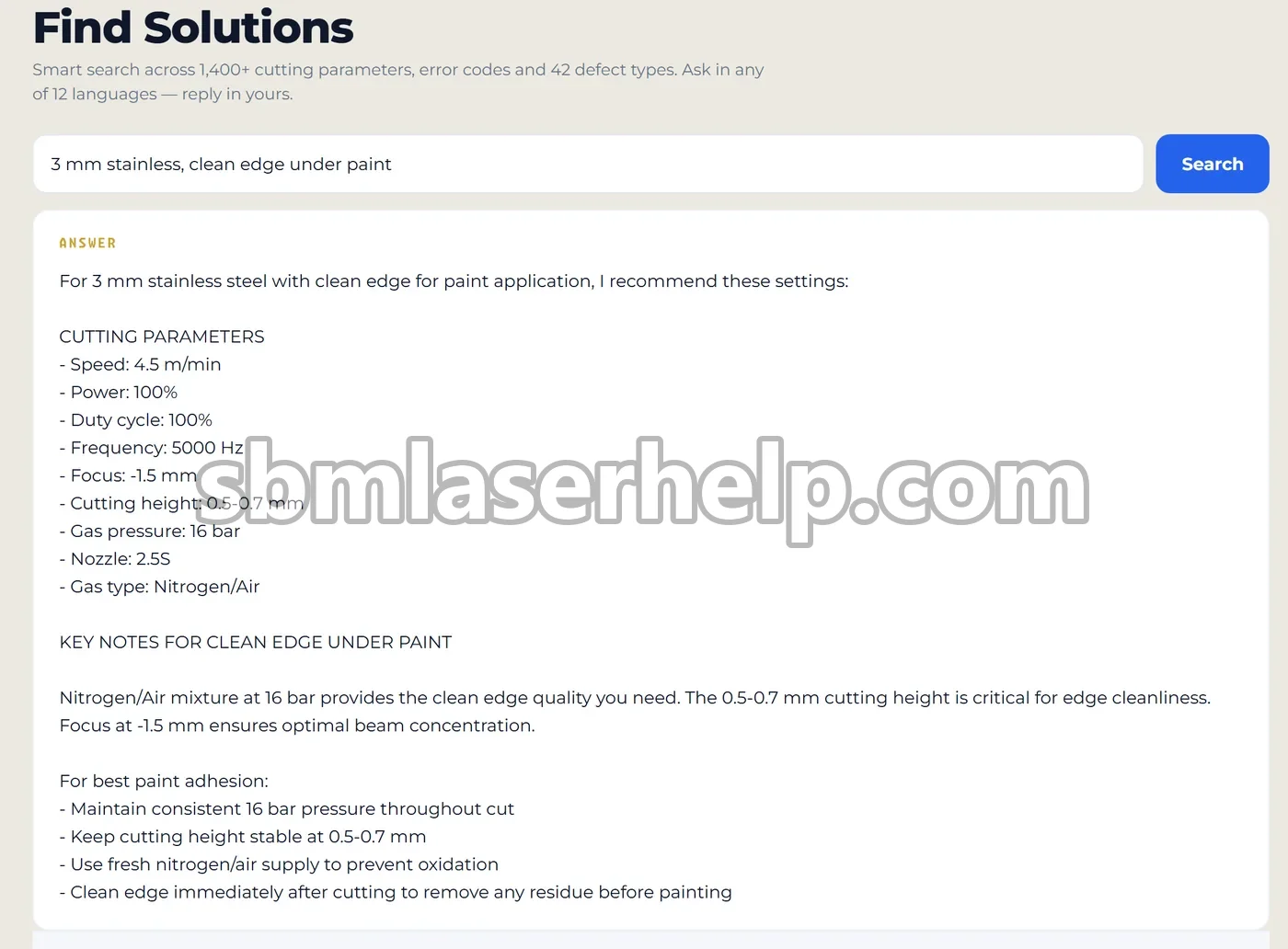
- Describe the job or the problemAdd the details that matter: metal, thickness, laser power, gas and what you see. Example: "3 mm stainless, clean edge under paint".
- Press SearchThe answer appears in the "Answer" block in a few seconds. Each search uses one search from your plan.
- Tell us if it helpedTap "It worked, thanks" or "It didn't work". If the problem stays, write to the SBM support team from the same screen.
- Find it again laterOpen Machine profile, then History, to see your past searches, parameter lookups and diagnostics.
Questions that get the best answers
The more facts you give, the closer the answer is to your machine. A good question names the material, thickness, laser power and assist gas, plus the symptom. Typical questions operators ask:
- Parameters for a job: "3 mm stainless, clean edge under paint" or "Nozzle and pressure for 1 mm aluminium".
- A defect on the part: "Why does 6 mm mild steel have burr on the underside?"
- An alarm on the machine: "S&A chiller E1" or "Fuji servo alarm" with the code from the screen.
- Theory and setup: "Why does the laser not cut through 10 mm?" or "What focus for thin carbon steel?"
For a defect you can see on the part, Cut Photo Analysis often works better: you pick the symptom, upload a photo of the cut and get the cause and the fix.
Smart search limits by plan
| Tool | Free | Operator | Engineer | Professional |
|---|---|---|---|---|
| Find Solutions (smart search) | 2 | 5 | 10 | 20 |
| Answer history | Last 3 | Full | Full | Full |
Searches per 30-day period. Limits renew 30 days after signup or after your plan renews. Rating an answer and opening an old question from History do not use a search.
Prices: Operator $3.99, Engineer $7.99, Professional $14.99 a month. Compare plans.
Questions and answers
- How do I find laser cutting parameters by describing the job in my own words?
- Use Find Solutions, the smart search in the SBM Laser Help app. Type the metal, thickness, laser power and gas, for example "3 mm stainless, nitrogen, 3 kW", and the answer comes from the cutting parameter base. For a full table by metal and thickness, see parameter tables.
- Why does my laser cut have burr on the bottom edge?
- Burr or dross under the cut usually means speed, focus position, gas pressure and nozzle do not match the material and thickness. Ask the SBM Laser Help smart search with your exact metal, thickness, power and gas, and it suggests what to change first. A photo of the cut in Cut Photo Analysis narrows it down further.
- What does a laser chiller or servo error code mean?
- Each code points to a specific fault, for example S&A CWFL chiller E1 means the air around the chiller is above 40 °C. Type the code into Find Solutions or open the error code list in the Reference guide. Public pages: error codes.
- Is the laser cutting smart search free?
- Yes, the Free plan includes 2 searches every 30 days. Operator ($3.99 a month) gives 5, Engineer ($7.99) gives 10 and Professional ($14.99) gives 20. See pricing.
- Can I ask in Spanish, Portuguese or another language?
- Yes. Find Solutions accepts questions in any of the 12 languages of SBM Laser Help and answers in the language of your app.
- Where can I see my previous searches?
- In the History tab of your Machine profile in the app or the web app. The Free plan shows your last 3 entries, paid plans show the full history. See Machine profile.
- What if the answer did not solve my problem?
- Tap "It didn't work" under the answer. The app asks what went wrong and can open a chat with the SBM support team with your question attached, so you do not need to explain it twice.